
Time Card Calculator
A work hours calculator for your time card: total your hours with breaks and lunch, in hours and minutes and in decimal, and see what your employer's rounding policy adds up to over a year.
Updated 30 October 2026.
This is a free time card calculator that does the usual job, and one thing no other free one does. It totals your hours with unpaid breaks, handles overnight shifts and splits regular from overtime. Then, if your employer rounds clock punches, it shows your exact hours beside your rounded hours and tells you what the difference comes to over a year.
- Your real hours, first. Exact minutes, in hours and minutes and in decimal.
- What rounding does to them. The gap, per day and per year, in hours and in money.
- Both directions. Rounding sometimes pays you more than you worked. It says so when it does.
Whatever you type here is not saved or sent anywhere. We never see it, and it is gone when you close the page. Daylight saving follows United States rules unless you change it below, which is what makes the two clock-change nights come out right.
Your hours
Total hours
Example: 41.08 in decimal, 5 days worked
Hours worked each day. Amber is time past your daily overtime limit, if you set one.
RUNG BARS · ONE RUNG = A QUARTER HOUR
What the rounding does
Each day's real minutes against what the rounding pays. Hollow is what you worked, ink is what you are paid for, and each bead between them is one minute.
DUMBBELL QUEUE · ONE BEAD = ONE MINUTE
Week by week
| Week | Total | Regular | Overtime | Double time |
|---|
Minutes to decimal hours
Payroll multiplies hours by a rate, so it needs decimal hours. Take the minutes past the hour from the chart: 8 hours 15 minutes is 8.25, and 8 hours 45 minutes is 8.75. Typing 8.15 instead pays eight hours and nine minutes.
| Minutes | Decimal |
|---|---|
| 1 | 0.02 |
| 2 | 0.03 |
| 3 | 0.05 |
| 4 | 0.07 |
| 5 | 0.08 |
| 6 | 0.10 |
| 7 | 0.12 |
| 8 | 0.13 |
| 9 | 0.15 |
| 10 | 0.17 |
| 11 | 0.18 |
| 12 | 0.20 |
| 13 | 0.22 |
| 14 | 0.23 |
| 15 | 0.25 |
| Minutes | Decimal |
|---|---|
| 16 | 0.27 |
| 17 | 0.28 |
| 18 | 0.30 |
| 19 | 0.32 |
| 20 | 0.33 |
| 21 | 0.35 |
| 22 | 0.37 |
| 23 | 0.38 |
| 24 | 0.40 |
| 25 | 0.42 |
| 26 | 0.43 |
| 27 | 0.45 |
| 28 | 0.47 |
| 29 | 0.48 |
| 30 | 0.50 |
| Minutes | Decimal |
|---|---|
| 31 | 0.52 |
| 32 | 0.53 |
| 33 | 0.55 |
| 34 | 0.57 |
| 35 | 0.58 |
| 36 | 0.60 |
| 37 | 0.62 |
| 38 | 0.63 |
| 39 | 0.65 |
| 40 | 0.67 |
| 41 | 0.68 |
| 42 | 0.70 |
| 43 | 0.72 |
| 44 | 0.73 |
| 45 | 0.75 |
| Minutes | Decimal |
|---|---|
| 46 | 0.77 |
| 47 | 0.78 |
| 48 | 0.80 |
| 49 | 0.82 |
| 50 | 0.83 |
| 51 | 0.85 |
| 52 | 0.87 |
| 53 | 0.88 |
| 54 | 0.90 |
| 55 | 0.92 |
| 56 | 0.93 |
| 57 | 0.95 |
| 58 | 0.97 |
| 59 | 0.98 |
| 60 | 1.00 |
Rounded to two decimal places, which is what most payroll systems store.
Is it legal for my employer to round my time?
Your employer is allowed to round your clock punches. Under 29 CFR 785.48(b) they may round to the nearest 5 minutes, the nearest tenth of an hour, or the nearest quarter hour. Rounding to the quarter is the one people have heard of: punch in 1 to 7 minutes past and it rounds down, 8 to 14 minutes past and it rounds up. That is the seven minute rule.
It is legal on one condition, and the condition is the whole thing. The rounding must not result, over time, in failing to pay people for the time they actually worked. In other words it has to average out.
Here is the problem. Two people on the same policy can have completely different outcomes, and neither of them can see it:
| Clocks in | Clocks out | Worked | Paid | Difference | |
|---|---|---|---|---|---|
| Alex | 8:53 becomes 9:00 | 5:08 becomes 5:15 | 8:15 | 8:15 | none |
| Sam | 8:53 becomes 9:00 | 5:06 becomes 5:00 | 8:13 | 8:00 | 13 minutes a day |
Alex loses seven minutes in the morning and gains seven in the evening. The rounding washes out, exactly as the rule intends. Sam loses at both ends, through nothing more than habitually leaving a couple of minutes earlier. Thirteen minutes a day across a working year is about 54 hours. And because Sam's real week was 41 hours and 5 minutes, the rounding does not just shave off regular time, it pulls the week back under 40 and removes the overtime premium altogether.
Sam's timesheet reads 9 to 5 and looks perfectly ordinary. There is nothing on it to notice.
Every other free time card calculator either rounds silently, so you never see your exact hours, or refuses to round and tells you to apply your employer's rule yourself. This one shows you both numbers and the gap between them. Enter a normal week of your real punches, set the rounding your employer uses, and read the answer.
This is arithmetic, not legal advice. It tells you what your own numbers do. What to do about it, if anything, is a separate question and one worth asking someone qualified.
How to fill this in
Start with the date your pay period begins and how long it runs. A week is the default; two weeks gives you a biweekly card, and anything up to 31 days works if your period is unusual.
For each day you worked, put in the time you clocked in and the time you clocked out, then the unpaid break in minutes. Days you did not work can be left empty and they will not count towards anything. If a shift runs past midnight, just enter it: 10pm to 6am is understood as one shift, not a negative number.
The overtime settings matter more than they look. Forty hours a week is the federal threshold. Some states and some employers also pay overtime after a set number of hours in a single day, and where both apply you get whichever gives you more, which is what this does. If you work somewhere that pays double time after a longer day, set that too.
Last, the rounding. Leave it off and you get your exact minutes. Set it to whatever your employer uses and a second set of numbers appears underneath, showing what those same punches become once the rounding is applied, and what the gap is worth over a year.
Read more on hours, overtime and leave: what federal law asks of an employer, and the templates for it.
The Time Card Calculator above works out one period. Whether rounding averages out is a question about months.
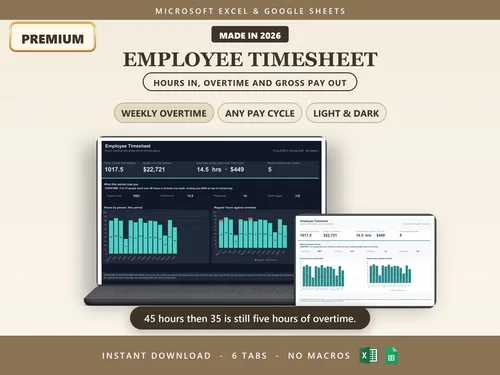
Employee Timesheet
A single card tells you what happened in one week or two. Whether a rounding policy really averages out needs the weeks kept side by side rather than recalculated one at a time.
Related
This page answers how many hours. For what those hours are worth once a bonus or a second pay rate is involved, use the Overtime Calculator, which works out the blended rate a week at a time. For the tax side, the No Tax on Overtime Calculator works out how much of that overtime you can deduct. And if you earn paid time off, the PTO Accrual Calculator shows your balance on any date.
Questions people ask
Do I need this or the overtime calculator?
It depends on what you have in front of you.
- Use this one if you have clock-in and clock-out times. It adds up each day, takes off unpaid breaks, handles shifts that run past midnight, and shows what rounding your punches costs over a year.
- Use the overtime calculator if you already know the hours for each week and want to know what they pay, especially when a bonus or a second pay rate is involved. Those raise the rate overtime is paid at, and this page does not account for them.
Both follow the same overtime rules, weekly and daily, so either one will tell you when overtime starts.
What is the 7-minute rule?
It is the name given to rounding clock punches to the nearest quarter hour. Punch in 1 to 7 minutes past the quarter and the time rounds down; 8 to 14 minutes past and it rounds up. Employers may do this under 29 CFR 785.48(b), and may also round to the nearest 5 minutes or the nearest tenth of an hour, which is 6 minutes.
Is rounding my clock-in times legal?
Yes, with one condition that does all the work. The regulation permits rounding only where it will not result, over a period of time, in failing to compensate employees properly for all the time they have actually worked. A policy that averages out is fine. One that consistently lands against the worker is not, even if it looks neutral written down. Nothing in the wording makes that easy to check, which is what the comparison on this page is for.
How do I know if rounding is costing me?
Put in a normal week of your real punches and set the rounding your employer uses. You get your exact hours and your rounded hours side by side, and the gap for the period and for a year. Near zero means it is washing out as intended. Consistently against you means you have a number instead of a feeling. It runs the other way too, and when rounding pays you more than you worked the page says so.
Can my employer round my lunch break?
Generally no. Rounding is for shift start and end times. Rounding an unpaid 30 minute lunch down to 15 takes paid time away and can breach minimum wage and overtime rules. This calculator never rounds breaks and does not offer it as an option.
Is a 10pm to 6am shift always 8 hours?
No, and it catches out most calculators. On the night the clocks go forward it is 7 hours, because an hour never happens. On the night they go back it is 9. This one works out the real elapsed time from the calendar date rather than subtracting clock times, so both nights come out right, and it flags the day when one of them applies.
Why does a two week card show two separate weeks?
Because overtime is settled per week and never averaged across a pay period. Forty five hours one week and thirty five the next is five hours of overtime, not a tidy eighty with none. A calculator that adds the two weeks together and compares the total to eighty quietly loses that overtime.
Hours and minutes, or decimal hours?
Both, for different jobs. Eight hours and fifteen minutes is 8:15 on a timesheet and 8.25 in payroll, because payroll multiplies hours by a rate. The common slip is typing 8.15, which is eight hours and nine minutes. Every total here is shown both ways so there is nothing to convert by hand.
What if I forgot to clock out?
Nothing here can recover a punch that was never made. Leave the day blank and it drops out of the totals, or enter what you believe the times were and treat the answer as the estimate it is. If the reconstructed week crosses your overtime threshold, that is worth raising while people still remember the day.
How do I calculate my time card by hand?
Work out each day on its own, then add the days up.
- Take the clock-in time away from the clock-out time. 8:52 am to 5:17 pm is 8 hours 25 minutes.
- Take off the unpaid break. With a 30 minute lunch that leaves 7 hours 55 minutes.
- If payroll wants decimal hours, divide the minutes by 60. 55 divided by 60 is 0.92, so 7.92 hours.
- Add the days together. Under federal law, anything over 40 hours in one week is overtime.
The calculator above does the same steps for every day at once and shows each day's figure, so you can check it against your own sums.
How do I enter more than one break?
Add the day's unpaid breaks together and enter the total in the break column. A 30 minute lunch plus an unpaid 15 minute break is 45 minutes.
Leave out short rest breaks. Under federal rules a break of 5 to 20 minutes counts as paid working time, so it should not come off your hours. A meal break of 30 minutes or more, where you are fully off duty, is usually unpaid.
Is there a time card conversion chart?
Yes. The minutes to decimal hours chart on this page lists every minute from 1 to 60. The ones people look up most: 15 minutes is 0.25, 30 minutes is 0.5, 45 minutes is 0.75, and 20 minutes is 0.33, not 0.20.
The usual mistake is typing 8.45 for 8 hours 45 minutes. 8.45 hours is only 8 hours 27 minutes; the right figure is 8.75.
Is a time punch or clock card calculator the same thing?
Yes. Time card, time punch, punch card and clock card calculators all do one job: turn the times you clocked in and out into the hours you worked. This one also shows what your employer's rounding of those punches adds up to over a year.